Saturday, August 30, 2008
Prim Friends Network

Wednesday, January 30, 2008
Advertise Your Websites For Free At Qassia
At Qassia, you can add your websites for free, and without having to add reciprocal backlinks. You'll get unlimited quality backlinks. You can also add intel. Short for "intelligence", intel is a tidbit of information. Qassia rewards users who add intel in three ways.
1. Backlinks You get one backlink for every piece of intel you add. Every intel will carry a direct backlink to one of your sites. So the more intel you add, the more backlinks you get.
2. Credit When you add intel, you also get credit, in the form of Qassia dollars. Your net worth in Qassia dollars determines how well your websites rank in our directory.
3. Revenue When your intel is displayed, you get 100% of the advertising revenue generated by that page. ( Revenue is used in $ signs but is NOT actual money, it is credits that is applied to your listed websites - the more credits/revenue you have, the higher rankings your sites gets).
What is Intel? Intel is information that you provide for others to read. It can be taken from your blog or website ( you are the original author or have been given permission from the original author to publish 'anywhere'). My article here may not be used as Intel because the information is about Qassia.
Intel may consist of any information, provided that copyright is not violated, and the intel is:
1. in English.
2. comprised of sentences as opposed to keywords.
3. non-pornographic.
4. not about Qassia.
What happens is when you publish Intel on your Qassia site, you receive credits. After it is submitted, it will be screened and rated by others ( outstanding, good job, etc.). The readers also receive credits towards their sites for each read Intel.
You will also receive credits for each referral from your site. For example when you click on my Qassia Site and sign up and then validate your email, I will receive $200 referral credits. The same will apply to you when you refer someone and they click on your Qassia Site, sign up and validate their email.
It seems like an interesing concept, and it's free, so what do you have to lose? Stop by my Qassia site and have a look for yourself.
You can click on other links provided to give you more indepth to what Qassia is all about.
I've listed my crafts website, graphics website and Zazzle website and plan to add my blogs as well. Every little bit of free advertising helps!Friday, July 20, 2007
Prim Talk Radio Show #66
Today’s Show:
Angie
host of
Heartland Graphics
will be sharing a segment on how to sell on Ebay for the Holiday Season this
is Part 2
We have a Featured Crafter Interview
today with Michele from
Holly Tree Primitives we encourage you to
click on her banner below and visit her great NEW site today!
Michelle Lammers
from
Scrappin with Army Wife
talks trying to find time to spend with
your kids, some alone time for yourself and some alone time with your husband.
Mary
Jo Elliott our newest staff member from
Fine Country Living Primitives
talks to you using Pip Berry Vines and Wreaths in your prim decorating, she
also has a wonderful summertime recipe she will be sharing with everyone!
Heather our newest staff member from
Cotton
Pickin Prims is here talk to us about getting your booth ready for
the upcoming Fall Craft Shows
Grab
our
Advertising Special 6 months
of Front Page advertising plus mention on every show for 50% off normal prices
the total is only $50 for six months!
Click here to order!
Click below to listen to our show
OR
Click here to visit our site
Saturday, February 24, 2007
Our "Post the Most" Contest Has Begun on Our Forums
We will be awarding prizes to the 3 forum members who post the most between Feb 24 to March 24. The contest is only open to members who are not on the staff at PTM...so you will not be competing against anyone who is a moderator. We will still be around posting with you though!! Our hope is that we will all get to know eachother a little better, learn from each other, and have some fun! I will be keeping track. Everyone starts at ZERO posts.
Check out these great prizes!! Come post on PT Magazine's forum and YOU could win!!
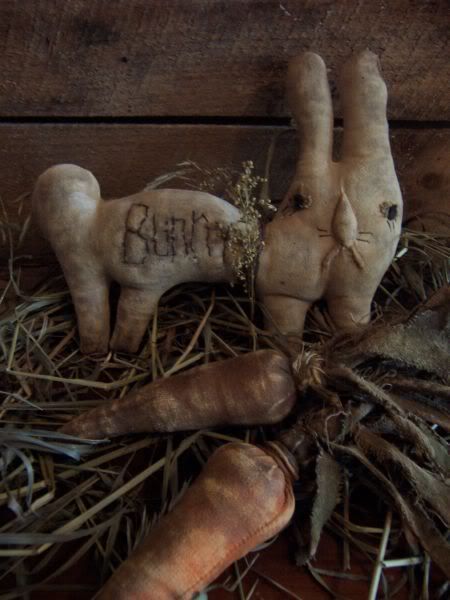
Prim Bunny with Prim Carrots
Retail Value $39.00
Prize donated by Paula of Rusty Pins and Old Lace
You can see more of Paula's products at
Rusty Pins and Old Lace
~*~ Second Prize ~*~
A Webset From Heartland Graphics or Heartland Vintage Graphics
Retail Value $30.00 to $50.00
Take a peek at Angie's great graphic collections at
Heartland Graphics
or Heartland Vintage Graphics
~*~ Third Prize ~*~
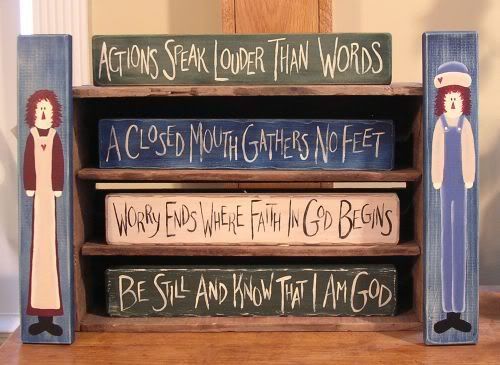
$25.00 gift certificate to Berry Country Crafts
Featuring handpainted country signs, pins and ornaments
Berry Country Crafts
I know you are going to want to come post with us now!!
Keep checking back here. Once a week, I will let you all know which members are the ones to beat!
Stop by Primitive Times Magazine Forums Today!
Wednesday, February 21, 2007
We're Having a St. Patrick's Day Scavenger Hunt On Our Primitive Times Magazine Forum
Come on over and join the St. Patrick's Day Scavenger hunt that we're having on our Primitive Times Magazine Forum!
What's that?
You don't know what a scavenger hunt?
Well, you are in for a treat!
It is game where we hide St Patricks Icons (see example below) throughout our Primitive Times Magazine Forum! We'll be hiding them on Mondays-Wed. On Fridays you get to find the icons! The more points you earn the better!
Here's the OFFICIAL RULES:
1-You can ONLY claim each icon TWO TIMES! When you find an icon post a message like I FOUND ICON so it can be counted.
2-You can play each round which begins on M-W-F.
3-NO CHEATING lol .
PRIZES
1st Place gets ONE MONTH Button ad on Heartland Marketplace and Primitive Times Magazine.
2nd Place gets Banner Rotation for one month on all sites.
3rd Place gets a PLUGBOARD Button animated by Angie!
GOOD LUCK
So, come on over to our Primitive Times Magazine Forum!
and "Sign-up" to play. Just CLICK on the " NEW Contests and Games Section" and then look for the "St. Patrick's Day Scavenger Hunt" thread.
CONTESTS STARTS MON FEB 26, 2007
SEE EXAMPLE OF ICONS BELOW
Copyright © 2007 - All Rights Reserved - Written By Linda Walsh of Linda Walsh Originals, Linda Walsh Originals E-Patterns, and Linda's Blog. Linda is a doll maker and doll pattern designer. http://lindawalshoriginals.com
Wednesday, January 10, 2007
What The....Are Plugboards?
A what?
A Plugboard!
What's that?
Well, basically they are FREE remotely hosted boards that you can create using customized HTML code that allow users to add their advertising banner themselves onto the plugboard on your website or blog. Their banners remain on your plugboard until they are bumped off, in which case, they can return and plug their banner again. This creates traffic for your website as the users keep coming back to your website to see if their banner is still there.
Using plugboards is very, very easy. Users just need to enter two pieces of information into the two clickable boxes on the bottom of your plugboard. They enter their button or banner URL and website or blog URL and then click "PLUG". Their banner is then added to your plugboard.
Where can you get a plugboard? At Plug-Board.com
They are easy to use and can host 4 different size banners: 88x31, 88x15, 50x50, and 468x60. Most plugboards house 88x31 size banners. Each plugboard can hold 60 buttons. However, this can be adjusted so your plugboard can hold more or less buttons. You can change the "Buttons per row" and/or "Number of rows" of buttons in your settings. 10 buttons are archived at any point in time so if you need to delete a button then you won't have a blank hole in your plugboard.
Each plugboard can be easily customized and controlled through a simple easy to use control panel that you can access on the plugboard website. You can edit and control who uses your plugboard by deleting buttons you don't want, ban users IP's you don't like, and ban domains. There is also a "Flood control" feature that holds the specified seconds between plugging times to help prevent spammers. You can also set you account up so that you are email notified when someone plugs on your board. You can even decide what background color you'd like to use for your plugboard or make it transparent.
After you establish an account and sign-in you will be brought to your "Posts" page where you will see all the banners on your plugboard. If this is a brand new plugboard they will all be blue in color with the text "Plug Your Site Here." You will also notice that there is a horizontal menu just above plug administration at the top of the page. The menu has the following options: Posts, Settings, Restrictions, HTML Code, Account, and Logout.
Each of these pages allows you to do different things to control your plugboard, which are as follows:
Posts - Here you can delete a banner, ban an IP address, ban a domain, and edit the IP of the button. The latter is useful if someone accidentally enters a URL or a website or banner with a typo and would like you to correct it.
Settings - On this page you can change your plugboards settings. You can change the background colour, disable posting, enter the number of seconds you want for flood control to prevent spammers, change the button size, change the number of buttons per row, change the number of rows, and edit your email notify.
Say for example you want to change your plugboard which uses 88x31 size banners from having 60 buttons set-up as 10 buttons per row and 6 rows to fit the sidebar of your blog. You would change the number of buttons per row to 2 and the number of rows to 30. If you want a really large plugboard on your website you might change the number of buttons per row to 8 and the number of rows to, say, 15 so your plugboard now holds 120 banners.
If you want to change the background field then just type the hex code without the # into the box or leave it blank for transparent.
If you don't want other people to post on your plugboard then click in the disable posting box and it will add a check mark there which will prevent users from posting their banner to your plugboard.
Flood control helps with spammers and contains the number of seconds you want to allow between plugs. Leave the flood control field blank to disable it.
If you want to be notified when someone adds their banner to your plugboard then check the E-mail box.
If you change anything in your settings then you need to click "Update" so your settings are changed.
Restrictions - On this page you are able to remove the ban on multiple IPs or URLs that you may have previously banned. Each row shows either an IP being blocked or a URL being blocked. To add an IP, enter the IP under "IP" and click Update. You do not have to enter a URL to ban an IP or vice versa.
HTML Code - This page contains the customized HTML or Alternate Javascript code you need to add to your website or blog based upon the settings you chose. All you need to do is to copy and paste the HTML code from the first box to wherever you would like your plugboard to be displayed. If you know HTML you can edit the code on your website. For example, the default for the plugboards is "center" alignment. You might want to change the code so the alignment is "left" or right" to better suit your website or blog.
I have found that the HTML code is the best code to use for most websites and blogs. There is an Alternative Javascript code in the second box. I have used this as well. However, I have found that when there is a problem with the plug-board.com website that the Javascript code tends to freeze the plugboard and not allow the rest of a blog to be displayed. If there is a problem on the Plug-board.com website the HTML code will leave the plugboard blank or show an error message.
Account - This page has your plugboard account information on it and it can be edited. Leave the password field blank if you do not want to change it.
Logout - For signing off your plugboard account.
You might be wondering if there are any rules for plugging. Who may or may not plug on your plugboards is entirely up to you. You determine the criteria for plugging and then remove those plugs that don't meet your criteria. Just make sure that your rules are clearly posted near your plugboard. For example, your rules might be as follows:
RULES: Please feel free to plug your website or blog if you are in craft related industry. We are a family-friendly website. Any non family-friendly plugs will be removed. Please only plug once and then wait for your banner to be removed before plugging again. Enjoy the plug.
Plugboards are a lot of fun and I should know. I have 8 of them. So, come on! Start plugging!!!!! You don't want to miss out on all the fun - do you!
Copyright © 2007 - All Rights Reserved - Written By Linda Walsh of Linda Walsh Originals, Linda Walsh Originals E-Patterns, and Linda's Blog. Linda is a doll maker and doll pattern designer. http://lindawalshoriginals.com
Tuesday, January 02, 2007
Primitive Times Plugboard
We have increased the size of our Plugboard on Primitive Times Magazine and are now offering BUTTON advertising on our plugboard for only $7 a month! Our Magazine draws in a lot of traffic monthly so getting a spot on our Plugboard is a great inexpensive advertising tool! Stop by today for more information!
http://www.primitivetimesmagazine.com/plugboard.htm
Tuesday, November 07, 2006
Get Free Advertising in our PRINT version for December
Saturday, November 04, 2006
Prim Banner Exchange
This is a great FREE Advertising tool as once again the banners that will showed are Craft and Country related so it will not deter from your sites appearance.
Stop by Prim Banner Exchange today
Monday, September 25, 2006
Fall and Christmas Contests
This is a great way to get FREE advertising for you site! So get to decorating your porches today! We will announce winners around October 20th for the Fall Picture and November 20th for the Christmas photo!
Best of luck
Angie
TO LEARN MORE ABOUT THIS CLICK HERE